


What Is an Electronics Bill of Sale?
An electronics bill of sale is a legal document that records the private sale and transfer of electronic devices from one party to another. It serves as proof of purchase and ownership transfer for items such as computers, smartphones, cameras, gaming consoles, and other consumer electronics.
Unlike a general bill of sale, an electronics bill of sale includes device-specific information such as serial numbers, model numbers, condition grading, warranty transfer status, and included accessories. These details are critical for verifying the item is not stolen, transferring manufacturer warranties, and resolving any post-sale disputes about the device's condition or functionality.
Whether you're selling a used MacBook, buying a camera from a private seller, or transferring ownership of high-end audio equipment, a properly completed electronics bill of sale protects both parties and provides the documentation needed for warranty claims, insurance, and potential resale.
Serial Number Tracking
Documents serial numbers to verify ownership and prevent stolen goods disputes
Condition Grading
Industry-standard condition assessment protects both buyer and seller
Warranty Transfer
Documents warranty status for seamless manufacturer coverage transfer
Electronics Bill of Sale by State
Each state has different rules regarding sales tax, consumer protection, and warranty transfer for private electronics sales. Some states require use tax on private purchases, others have specific consumer protection statutes, and return policies vary. Select your state below for a template tailored to your state's requirements.
How to Write an Electronics Bill of Sale
An electronics bill of sale must contain specific information to provide legal protection and facilitate warranty transfers. Follow these steps to ensure your document is complete.
Record Buyer and Seller Information
Include the full legal names, current mailing addresses, and phone numbers of both the buyer and seller. For high-value electronics, include driver's license numbers for additional verification. This information is essential if a warranty transfer requires proof of ownership change.
Identify the Electronic Device
Provide the brand, model name, model number, serial number, and color/finish. For computers, include processor, RAM, and storage specs. For smartphones, include the IMEI number and carrier lock status. For cameras, note the shutter count. Include any unique identifiers that distinguish this specific unit from others of the same model.
Grade the Condition
Use standard condition grades: New (sealed), Like New (minimal use, no wear), Good (fully functional, minor cosmetic wear), Fair (functional with noticeable wear), or Poor/For Parts (functional issues). Note any specific defects such as screen scratches, battery health percentage, dead pixels, or cosmetic damage. Be thorough and honest — this protects both parties.
Document Accessories and Inclusions
List all included accessories: chargers, cables, cases, original packaging, manuals, extra batteries, lenses, memory cards, controllers, etc. If original accessories are missing, note that as well. This prevents disputes about what was included in the sale.
Record Sale Price and Warranty Status
State the agreed purchase price in both numerals and written form. Note the payment method (cash, electronic transfer, etc.). Document the warranty status: whether the manufacturer warranty is still active, its expiration date, whether it transfers to the new owner, and whether any extended warranty or protection plan is included.
Sign, Date, and Confirm Data Removal
Both buyer and seller must sign and date the bill of sale. Print two copies — one for each party. The seller should confirm that the device has been factory reset and all personal accounts have been removed. The buyer should confirm they have tested the device and accept its condition. Include an as-is clause if no warranty is offered by the seller.
Key Components of an Electronics Bill of Sale
An electronics bill of sale must include specific information to protect both parties and facilitate warranty transfers. Missing any of these elements could leave you unprotected in a dispute.
| Component | Description |
|---|---|
| Buyer & Seller Names | Full legal names and addresses of both parties |
| Device Description | Brand, model name, model number, color/finish, and specifications |
| Serial Number | Unique manufacturer serial number (and IMEI for phones) |
| Condition Grade | New, Like New, Good, Fair, or Poor with specific notes |
| Included Accessories | Chargers, cables, cases, manuals, original packaging |
| Sale Price | Amount in numbers and words, payment method |
| Warranty Status | Active/expired, transferable, expiration date |
| As-Is / Warranty Terms | Condition acceptance and any seller warranty terms |
| Signatures | Dated signatures of buyer and seller |
Electronics Condition Grading Guide
Accurate condition grading is one of the most important parts of an electronics bill of sale. Using standard grades helps set clear expectations and prevents disputes after the sale.
Important: Be Honest About Condition
Misrepresenting the condition of electronics can be considered fraud in most states, even with an as-is clause. If you know about a defect (battery issues, screen burn-in, intermittent problems), disclose it. Honest disclosure protects you legally and builds trust with the buyer.
New / Sealed
Factory sealed, never opened. All original packaging, accessories, and documentation included. Full manufacturer warranty applies.
Like New / Open Box
Opened but barely used. No visible scratches, scuffs, or wear. All accessories present. Battery health 95%+ (if applicable). Functionally perfect.
Good
Fully functional with minor cosmetic wear. May have light scratches on body or screen. Battery health 80%+ (if applicable). All features work correctly.
Fair
Fully functional with noticeable cosmetic wear. Visible scratches, scuffs, or dents. Battery health may be reduced. Some original accessories may be missing.
Poor / For Parts
May have functional issues (cracked screen, battery problems, hardware defects). Sold for parts or repair. Heavy cosmetic wear. Buyer accepts all known and unknown issues.
Electronics Types Covered
Our electronics bill of sale templates work for all types of consumer electronics:
Computers / Laptops
Desktop computers, laptops, MacBooks, Chromebooks, and workstations with processor, RAM, and storage details
Smartphones / Tablets
iPhones, Android phones, iPads, tablets, and e-readers including IMEI and carrier lock status
Cameras / Lenses
DSLR cameras, mirrorless cameras, lenses, and professional photography equipment with shutter count
Gaming Consoles
PlayStation, Xbox, Nintendo Switch, and handheld gaming devices with accessories and game libraries
Audio Equipment
Speakers, headphones, amplifiers, turntables, and professional audio recording gear
TVs / Monitors
LED, OLED, and QLED televisions, computer monitors, and projectors with screen size and resolution
Drones
Consumer and commercial drones including FAA registration number, flight controller, and camera specs
Smartwatches / Wearables
Apple Watch, Fitbit, Garmin, and other wearable technology with band and sensor details
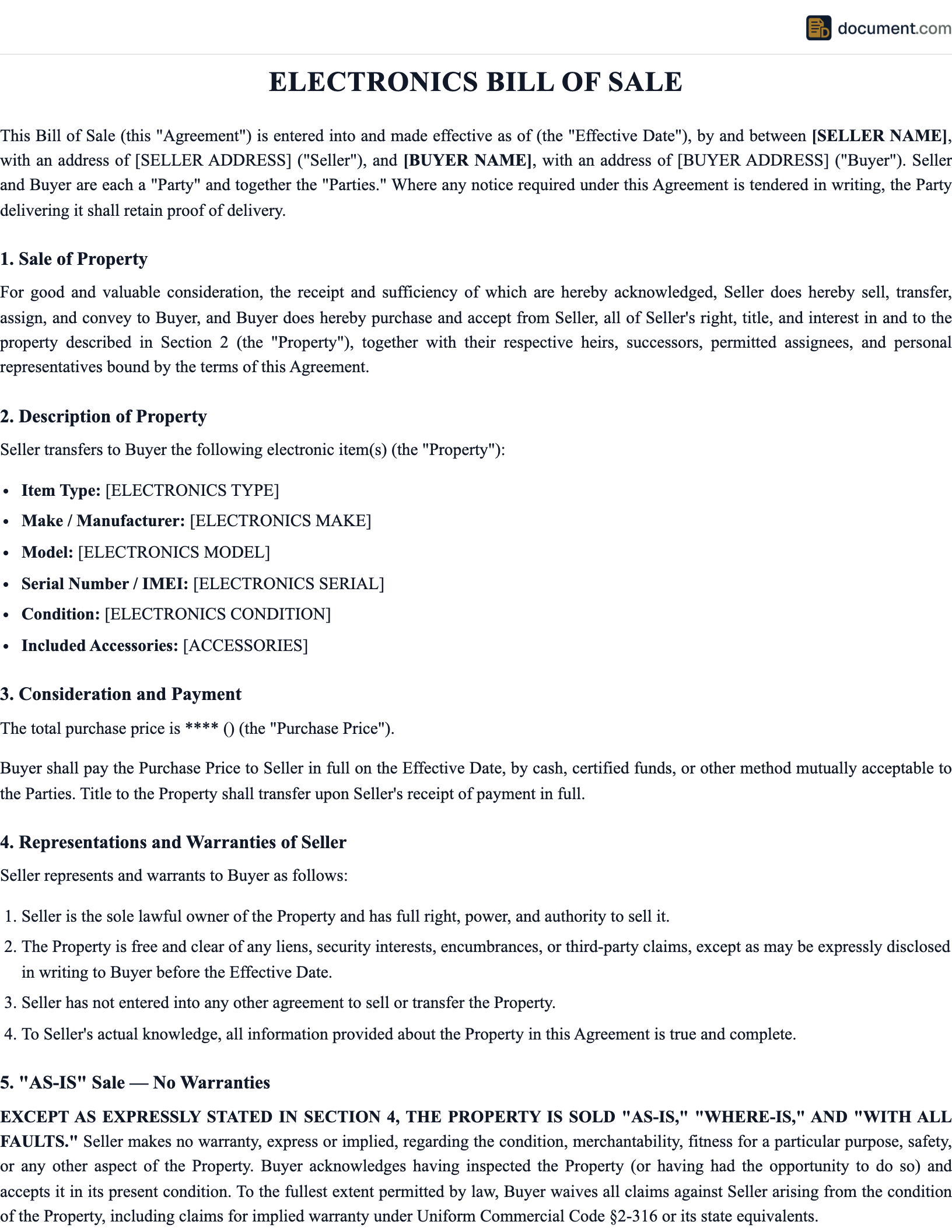
Sample Electronics Bill of Sale
Below is a preview of our electronics bill of sale template. Your customized document will include all fields relevant to your specific type of electronic device.
ELECTRONICS BILL OF SALE
Private Party Electronics Transfer Document
This Electronics Bill of Sale is entered into on[Date]between:
SELLER:
Name: [Seller Name]
Address: [Seller Address]
BUYER:
Name: [Buyer Name]
Address: [Buyer Address]
1. DEVICE DESCRIPTION
Brand: [Brand] Model: [Model]
Model Number: [Model #]
Serial Number: [Serial #]
Condition: [Grade]
2. WARRANTY STATUS
Warranty Active: [Yes/No] Expires: [Date]
Transferable: [Yes/No]
3. SALE PRICE
$[Amount]([Amount in Words] Dollars)
Frequently Asked Questions
Find answers to common questions about electronics bills of sale, warranty transfers, and private electronics sales.
Create your Electronics Bill of Sale in under 10 minutes.
Answer a few questions and download a compliant, attorney-drafted document ready for your state.