


What Is a Resume?
A resume is a structured document that summarizes your work experience, skills, education, and accomplishments for the purpose of applying for jobs. It is the single most important document in a job search because it determines whether you get an interview. Recruiters and hiring managers typically spend between six and ten seconds on an initial resume scan, so every word, bullet point, and design choice needs to work in your favor.
A strong resume does more than list your employment history. It tells a story of professional growth, quantifies your impact with numbers and results, and positions your skills in the context of what the target employer needs. It is not a biography. It is a marketing document, and the product is you. The best resumes are tailored to a specific role, clean in design, and honest in content.
Our template gives you a professional foundation that works for any industry and career level. It follows the formatting conventions that recruiters expect and is optimized to pass through applicant tracking systems (ATS) that many large employers use to screen applications before a human ever sees them.
Quantified Impact
Shows results with numbers, percentages, and measurable outcomes
ATS Compatible
Clean formatting that passes automated screening software
Professional Layout
Recruiter-tested design that highlights your strongest qualifications
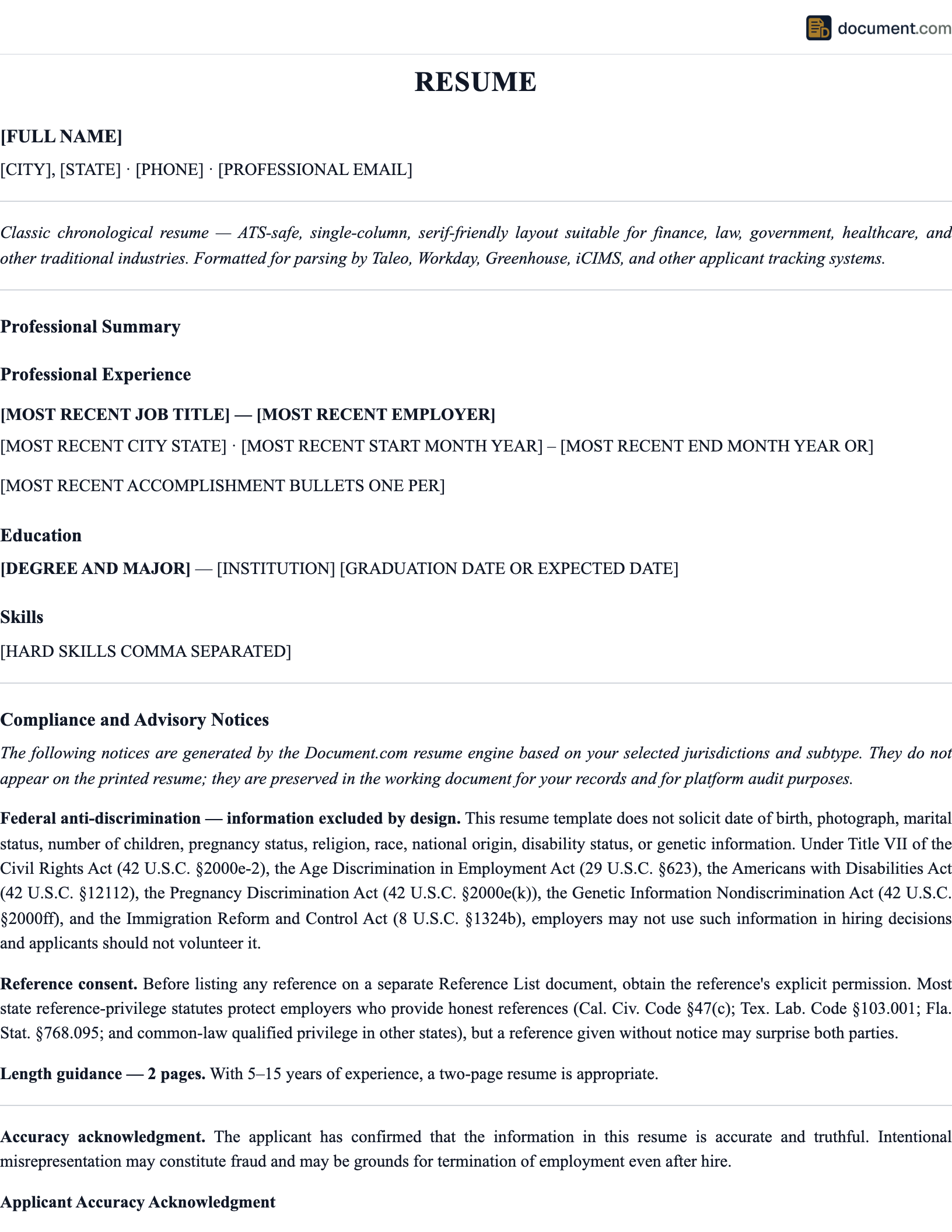
Resume Preview
The preview below shows the layout of a standard professional resume. Your final document will be customized with your information, experience, and skills.
[2-3 sentences summarizing your experience, key skills, and the value you bring to employers.]
- [Achievement with quantified result]
- [Achievement with quantified result]
- [Achievement with quantified result]
[Degree] | [University Name] | [Graduation Year]
[Skill 1] | [Skill 2] | [Skill 3] | [Skill 4] | [Skill 5]
Essential Resume Sections
Contact Information
Your name, city and state (full address is no longer necessary), phone number, professional email, and LinkedIn URL.
Professional Summary
Two to three sentences highlighting your experience level, core skills, and the value you bring. Replace the outdated objective statement.
Work Experience
Your relevant employment history in reverse chronological order. Each role should include your title, the company, dates, and bullet points with accomplishments.
Education
Degrees, certifications, and relevant coursework. Include the school name, degree, and graduation year. List this before experience if you are a recent graduate.
Skills
Technical and soft skills relevant to the target role. Match these to the keywords in the job description for better ATS performance.
Certifications (Optional)
Professional certifications, licenses, or training relevant to your field. Include the issuing body and expiration date if applicable.
How to Write a Resume
- 1
Start with the job description
Read the posting carefully and identify the keywords, skills, and qualifications the employer emphasizes. Your resume should mirror this language naturally.
- 2
Lead with a professional summary
Write two to three sentences that capture your experience level, strongest skills, and the type of value you bring. This replaces the outdated objective statement.
- 3
Quantify your accomplishments
For each role, write bullet points that start with a strong action verb and include a measurable result. 'Managed a team of 12' is stronger than 'Responsible for team management.'
- 4
Tailor for each application
Adjust your summary, skills, and bullet points to match the specific job. A generic resume sent to 100 companies will underperform a targeted one sent to 20.
- 5
Keep the design clean
Use a single-column layout, consistent fonts, clear section headings, and enough white space. Fancy graphics and multi-column layouts often break in ATS software.
- 6
Proofread everything
Read the resume aloud, then have someone else review it. Check for typos, inconsistent formatting, and the correct spelling of company names and job titles.
Strong Action Verbs for Your Resume
Starting each bullet point with a strong action verb makes your accomplishments concrete and compelling. Avoid weak starters like "responsible for" or "helped with." Here are verbs organized by category:
Leadership
Directed, Oversaw, Spearheaded, Championed, Orchestrated, Mobilized, Mentored, Steered
Achievement
Delivered, Exceeded, Surpassed, Attained, Earned, Secured, Captured, Generated
Improvement
Streamlined, Optimized, Redesigned, Revamped, Accelerated, Consolidated, Reduced, Eliminated
Creation
Launched, Built, Developed, Established, Pioneered, Introduced, Authored, Engineered
ATS Optimization
Applicant tracking systems (ATS) are software tools that many employers use to filter resumes before a recruiter sees them. Over 90% of large companies and a growing number of small businesses use some form of ATS. If your resume is not formatted for these systems, it may be rejected automatically, no matter how qualified you are.
To optimize for ATS, use standard section headings like "Experience," "Education," and "Skills." Avoid tables, text boxes, images, headers and footers (many ATS tools cannot read content placed in header/footer areas), and unusual fonts. Use keywords from the job description naturally throughout your resume, especially in the skills section and work experience bullet points. Submit in PDF or .docx format depending on what the employer requests.
Our template uses a single-column, ATS-friendly layout that is designed to be parsed correctly by the most common screening tools, including Workday, Greenhouse, Lever, iCIMS, and Taleo.
Formatting Tips
One page for most candidates
Unless you have 10+ years of relevant experience, keep it to one page. Two pages is the maximum for experienced professionals.
10.5 to 12 point font
Use professional fonts like Calibri, Garamond, or Helvetica. Anything smaller than 10.5 is hard to read; anything larger wastes space.
Standard margins
Keep margins between 0.5 and 1 inch on all sides. Narrow margins cram content; wide margins waste space.
Consistent formatting
Use the same style for every job title, date range, and bullet point. Inconsistency signals carelessness.
Frequently Asked Questions
Official Resources
Bureau of Labor Statistics
Occupational Outlook Handbook with salary data and job growth projections
CareerOneStop
U.S. Department of Labor career tools, resume tips, and job search resources
DOL Training Resources
Federal workforce training, apprenticeship, and career development programs
SHRM
Society for Human Resource Management hiring and talent acquisition insights
Create your Resume in under 10 minutes.
Answer a few questions and download a compliant, attorney-drafted document ready for your state.