



What Is an Internet Use Policy?
An internet use policy is a written document that defines how employees are expected to use company-provided internet access, email, devices, and digital tools during work hours. It covers acceptable and prohibited activities, explains whether and how the employer monitors online behavior, addresses personal use of company resources, and outlines consequences for violations. Most companies include it as a section within their employee handbook, but it can also stand alone as a separate policy distributed during onboarding.
Without a written policy, employers have little recourse when an employee uses company bandwidth for personal streaming, downloads malware through an unauthorized app, leaks proprietary data through a personal email account, or posts confidential information on social media. A clear policy removes ambiguity and gives managers a consistent framework for addressing misuse before it becomes a serious security or legal problem.
Our template is built for businesses of any size and covers the areas that matter most: acceptable use boundaries, monitoring disclosures, social media guidelines, BYOD rules, AI tool restrictions, cybersecurity expectations, and a disciplinary framework. It also includes NLRA-compliant language so your social media and confidentiality provisions do not inadvertently restrict protected employee activity.
Security Foundation
Reduces risk of malware, data breaches, and unauthorized access
Monitoring Transparency
Discloses surveillance practices so employees know what is tracked
Liability Protection
Documents rules that support disciplinary and legal action if needed
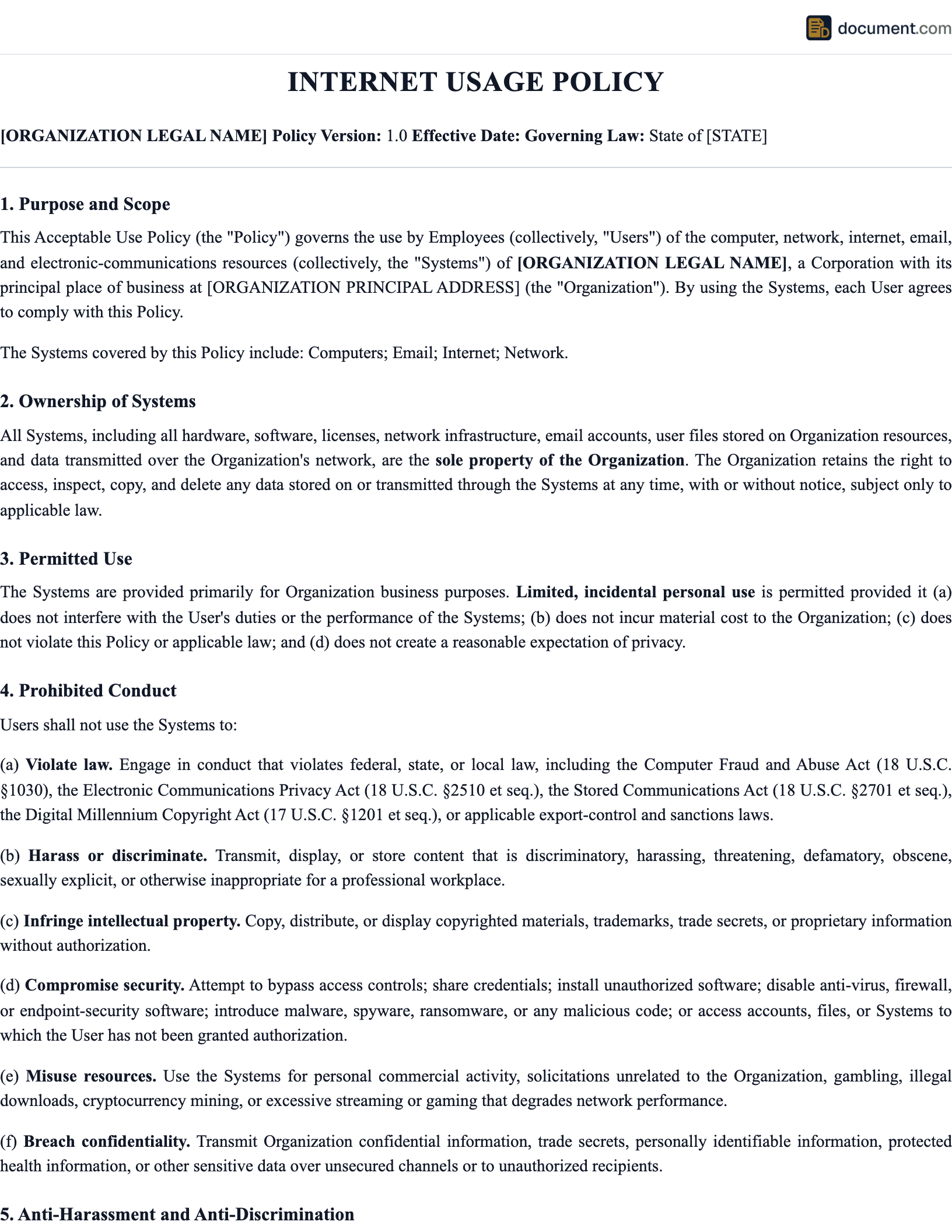
Internet Use Policy Preview
The preview below shows the key sections of a standard workplace internet use policy. Your final document will be customized with your company name, specific rules, and enforcement procedures.
[Company Name] Internet and Technology Use Policy
1. Purpose
This policy establishes guidelines for acceptable use of [Company Name]'s internet access, email systems, computer equipment, and digital tools. All employees are expected to use these resources responsibly and in compliance with applicable laws.
2. Scope
This policy applies to all employees, contractors, and temporary staff who access [Company Name]'s network, devices, or internet services.
3. Acceptable Use
Company internet access is provided primarily for business purposes. Limited personal use is permitted provided it does not interfere with work duties, consume excessive bandwidth, or violate any provision of this policy.
4. Prohibited Activities
[List of prohibited activities including illegal downloads, harassment, unauthorized software, etc.]
5. Monitoring
[Company Name] reserves the right to monitor all internet activity, email communications, and device usage on company-owned systems. Employees should have no expectation of privacy when using company resources.
What to Include in an Internet Use Policy
Purpose and Scope
Define why the policy exists and who it covers: employees, contractors, interns, and anyone else with network access.
Acceptable Use Rules
Clarify what personal use is allowed, set expectations for business use, and describe any content restrictions.
Prohibited Activities
List specific banned behaviors: illegal downloads, harassment, unauthorized software, data exfiltration, and security bypass attempts.
Email and Messaging
Address company email etiquette, personal email use, phishing awareness, and retention of business communications.
BYOD and Personal Devices
Define rules for employees who connect personal phones or laptops to the company network or access company data remotely.
AI and Emerging Tools
Specify which AI tools are approved, prohibit entering confidential data into public AI services, and set expectations for AI-generated work.
Data Security
Require strong passwords, prohibit sharing credentials, mandate VPN use for remote access, and address cloud storage rules.
Acknowledgment Form
Include a signature block confirming the employee has received, read, and understood the policy.
Monitoring and Privacy
Employers have broad authority to monitor employee internet activity on company-owned devices and networks. The Electronic Communications Privacy Act (ECPA) permits monitoring when the employer provides the equipment or when employees consent. However, state laws add layers of complexity. Connecticut requires employers to give written notice before monitoring. Delaware requires similar notice. California and Illinois have broader privacy protections that can limit monitoring of personal accounts even on company hardware.
The safest approach is full transparency. Your internet use policy should clearly state what is monitored (web browsing, email, messaging, file transfers, keystrokes), what tools are used (content filters, endpoint detection, logging software), and that employees should have no expectation of privacy when using company systems. When employees sign an acknowledgment of this policy, the employer gains strong legal footing to use monitoring data in investigations, disciplinary proceedings, or litigation.
For remote employees, monitoring raises additional questions about personal home networks and personal devices. Be explicit about what the company monitors on remote connections, whether a VPN must be active during work hours, and whether the company installs monitoring software on personal devices used for work.
Enforcement and Consequences
A policy without enforcement is just a suggestion. Your internet use policy should include a clear disciplinary framework that explains the range of consequences for violations, from a verbal warning for minor infractions to immediate termination for serious breaches like distributing illegal content, stealing data, or deliberately introducing malware.
The key to defensible enforcement is consistency. If two employees commit the same violation and one receives a warning while the other is terminated, the company opens itself to claims of discrimination or favoritism. Document every incident, follow the same process for every employee, and involve HR and legal counsel when the situation involves potential criminal activity, harassment, or data breach notification requirements.
Frequently Asked Questions
Official Resources
CISA Cybersecurity Resources
Federal cybersecurity best practices and workplace security guidance
FTC Privacy & Security
Federal Trade Commission guidance on data protection and employee privacy
NLRB Protected Activity
National Labor Relations Board guidance on employees' concerted activity rights
SHRM
Society for Human Resource Management technology and workplace policy resources
Create your Internet Policy in under 10 minutes.
Answer a few questions and download a compliant, attorney-drafted document ready for your state.
Social Media at Work
Social media policies are one of the trickiest parts of any internet use document because they sit at the intersection of employer interests and employee rights. You can prohibit employees from sharing trade secrets, confidential customer data, or proprietary business information on social media. You can require employees to disclose their employment when posting about the company. You can prohibit discriminatory, harassing, or threatening speech connected to the workplace.
But you cannot prohibit employees from discussing wages, working conditions, or unionization. Those conversations are protected concerted activity under Section 7 of the National Labor Relations Act, and the NLRB has invalidated dozens of employer social media policies for being too broad. Any social media policy should include a clear carve-out stating that nothing in the policy restricts employees from exercising their rights under the NLRA.
During work hours, it is reasonable to limit social media use to breaks or personal time, especially if excessive browsing affects productivity. Some companies block social media sites on the corporate network entirely. Others take a more flexible approach and simply set expectations. Whatever you choose, apply the standard consistently.