

If you imported anything into the United States during the IEEPA tariff window and paid those duties, there is a real chance you are owed money back. CBP’s Consolidated Administration and Processing of Entries (CAPE) refund portal went live on April 20, 2026, and for most importers it is the only path to claim those refunds. Roughly 330,000 businesses paid IEEPA duties that may now be refundable, and up to 82% of those payments, about $127 billion, fall into Phase 1’s eligibility window, according to news coverage of CBP’s rollout.
The portal works. The instructions for using it do not. CBP’s official one-pager is two pages of QR codes and bullets that gloss over the parts where most filers get stuck, the Form 5106 email requirement, the ACH bank step, and the actual CSV format. We pulled together every step from CBP’s own applicant guide, the IEEPA refunds landing page, and the Form 7501 instructions, then built the CAPE refund calculator and CAPE eligibility checkerbelow so you can answer the two questions everyone has, “do I qualify?” and “how much am I owed?”, before you even open the portal.
CAPE Tariff Refund Calculator: what is yours worth?
Use this CAPE refund calculator to estimate your Phase 1 refund, the wait, and what you’d give up by selling the IEEPA refund claim to a hedge fund. All math is client-side, nothing leaves your browser.
Estimates only. Actual refunds depend on CBP review, netting per 19 CFR § 159.1, and any offsets per § 24.72. Not legal or tax advice.
What CAPE Is and Who Qualifies for an IEEPA Refund
CAPE, short for Consolidated Administration and Processing of Entries, is a new module inside CBP’s Automated Commercial Environment (ACE). It exists to consolidate IEEPA duty refunds (including interest) rather than processing them entry by entry. CBP is rolling it out in phases. Phase 1 went live at 8am EST on April 20, 2026, and is intentionally narrow: it covers entries that have not yet been liquidated, plus entries that are still inside the 90-day voluntary reliquidation period. Anything that has been liquidated for more than 90 days, plus warehouse, suspended, or extended entries, falls outside Phase 1 and is being deferred to later phases.
Only two parties can file a CAPE Declaration: the Importer of Record (IOR) for the entries, or the licensed customs broker who originally filed those entries on the IOR’s behalf. Brokers can file a single Declaration covering up to 9,999 entries across multiple IORs they filed for. Anyone else , including authorized agents who were not the original filer, cannot file.
What You Need Before You Open the Portal
Before you start, gather four things. Missing any of them will stop you cold:
- An ACE Portal account with the Importer sub-account view (the most common reason filers stall, see Step 1)
- U.S. bank routing and account numbers for ACH refunds
- A complete list of every entry number where IEEPA duties were paid, pulled from your Form 7501 entry summaries
- A current company email address on your CBP Form 5106record, not your broker’s email, because CBP uses this address to authenticate your identity during ACE Portal account creation
CAPE Eligibility Checker: are your entries Phase 1 eligible?
Three quick questions to see whether your IEEPA-duty entries qualify for a CAPE refund under Phase 1. Answers stay in your browser, nothing is sent anywhere.
Are your IEEPA-duty entries still unliquidated?
Liquidation is CBP's final assessment of duties on an entry. Your customs broker can tell you the liquidation status, or it appears on Form 7501.
If liquidated, was the liquidation date within the last 90 days?
CBP's voluntary reliquidation period is 90 days from liquidation. Anything older than that is outside Phase 1.
Are any of these warehouse, suspended, or extended-review entries?
Warehouse entries (type 21–26), suspended liquidations, and entries under extension review fall outside Phase 1 by design.
Apply for an ACE Portal Account With Importer Access
If you already have ACE with the Importer sub-account, skip ahead. Most importers don't, and the Importer Application is a different form than the one CBP shows by default.
If your company already has an ACE Portal account with the Importer sub-account, skip to Step 2. If you have an ACE account but no Importer sub-account, you need to request the sub-account through CBP’s “Managing an ACE Portal Account” webpage. If you have neither, here is the path that worked when we ran it.
Go to CBP’s Applying for an ACE Secure Data Portal Account page and use the Importer Application, not the more prominent Application for All Other Trade Activities. The Importer Application is specifically scoped to trade parties that already have a Form 5106 record on file with CBP and do not yet have an ACE Portal top account.
The first screen asks for three things: company name, Importer Record Number (your IRS EIN, your CBP-assigned IR number, or your SSN if you import as an individual), and a business email that the Top Account Owner will use to log in. The IR# field accepts three formats, NN-NNNNNNNXX, NNN-NN-NNNN, or YYDDPP-NNNNN, and the form will tell you if your input doesn’t match one of them.
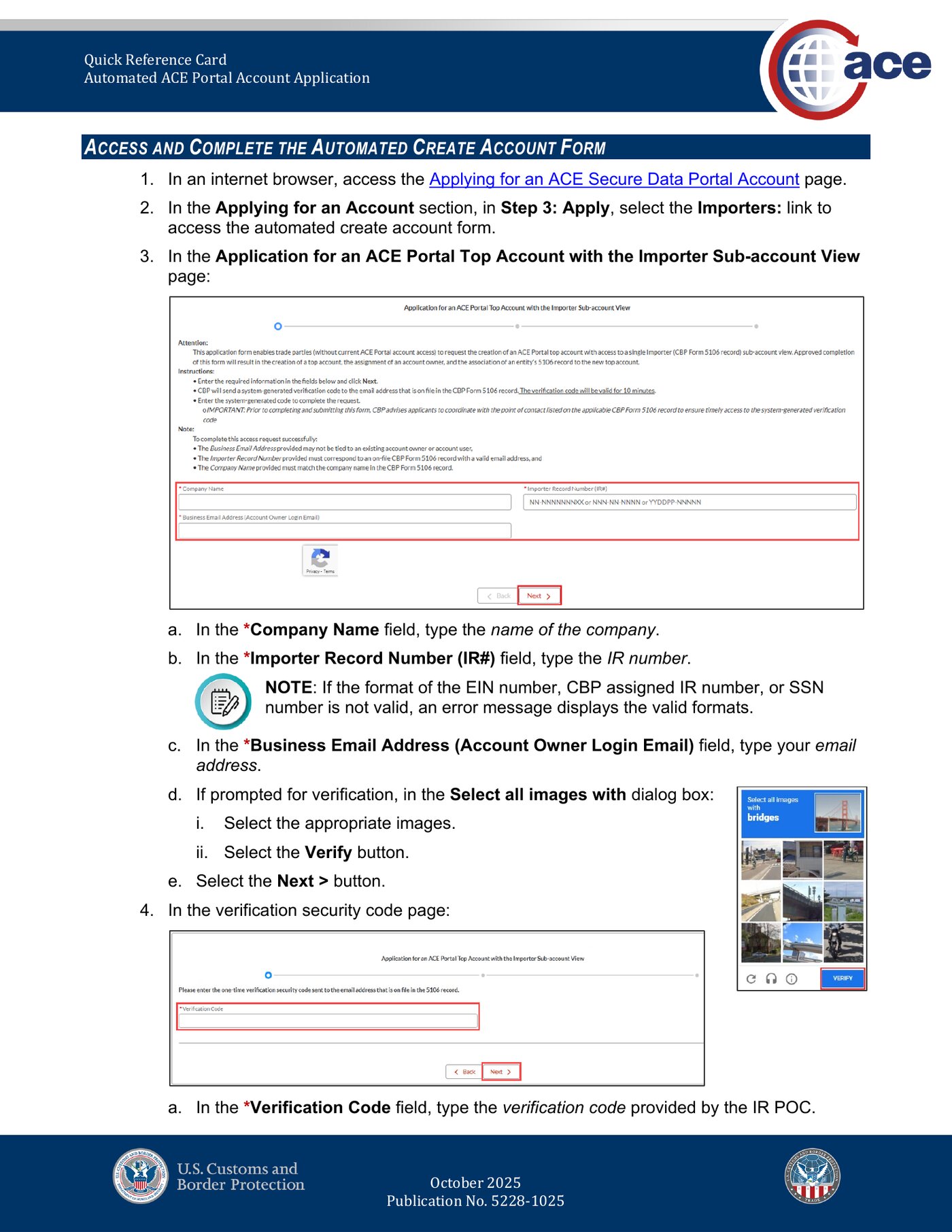
Submit the form. The system runs four checks behind the scenes: that your email isn’t already tied to an existing ACE Portal user, that the IR# and company name match an existing 5106 record, that the 5106 record has a current Point of Contact (POC) email, and that the IR isn’t already linked to a top account.
If everything checks out, CBP sends a verification code to the POC email on the 5106 record. This code is valid for ten minutes. If you’ve coordinated with whoever owns that mailbox in advance, you can paste it in immediately. If you haven’t, plan to. Hitting Back or letting the timer expire restarts the entire process and wipes the fields you already filled.
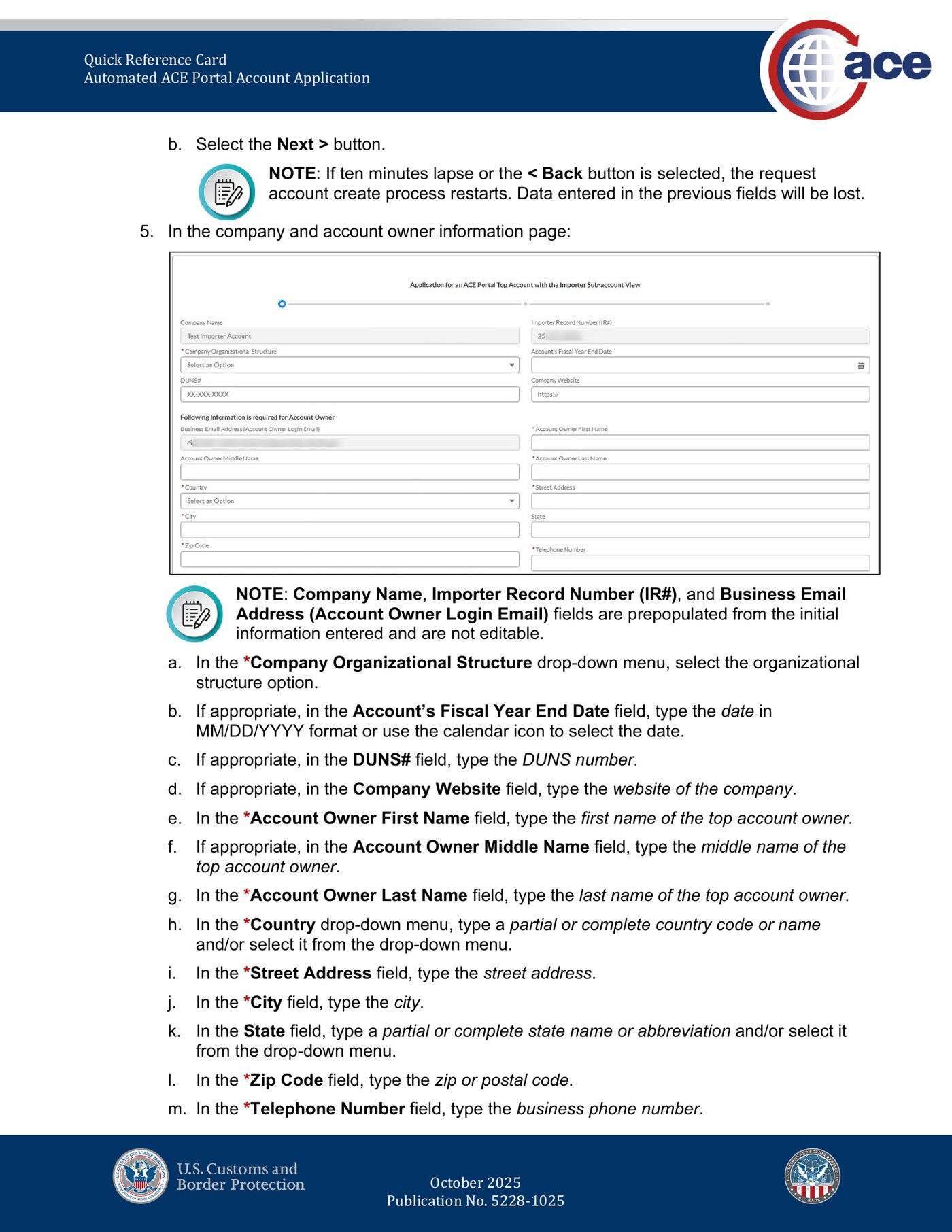
After the code is accepted, the form expands into the full account-owner intake screen. Company Name, IR#, and Business Email are pre-filled and locked. You add organizational structure, optional fiscal year-end and DUNS number, the Account Owner’s first/middle/last name, full mailing address, and a business phone.
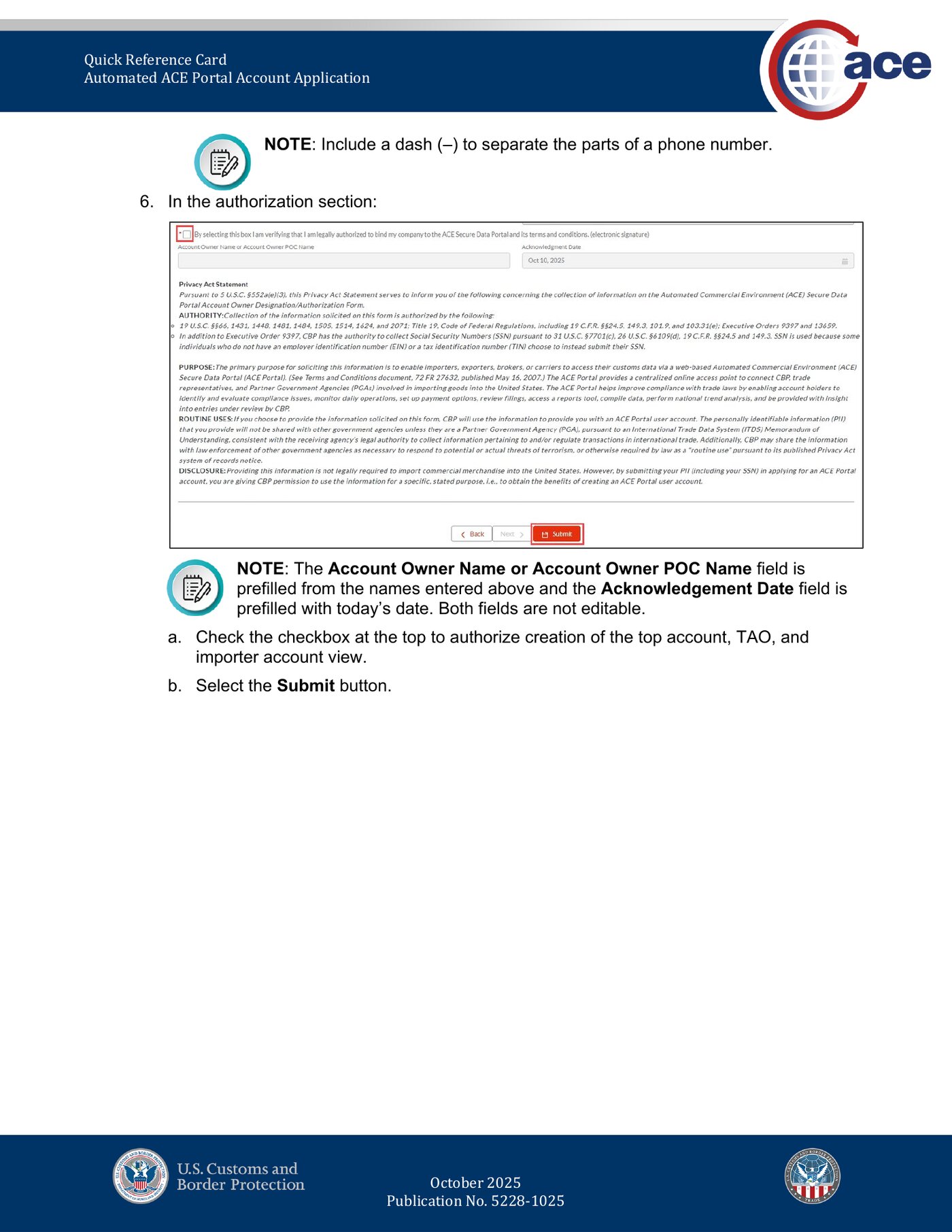
The final screen is the authorization page. The Account Owner Name field is pre-filled from your previous entries. The Acknowledgement Date is today’s date, also locked. Read the Privacy Act Statement, check the box authorizing creation of the top account and Trade Account Owner role, and click Submit.
You’ll then receive an email from [email protected]with the subject “ACE Secure Data Portal account has been created.” The email contains your assigned Account ID (a short alphanumeric string), your name as it will appear in the system, and the timestamp of when the account was provisioned.
Set Up Your Bank Details (ACH Refund Authorization)
If you skip this, your Declaration can be accepted and your refund will still bounce. The fix isn't optional, it's the route the money travels.
CBP issues every CAPE refund through ACH to a U.S. bank account on file. If you skip this step, your CAPE Declaration can still be accepted, your entries can still be reliquidated, and you will still not see a refund. Instead the system marks your refund as rejected and you have to re-enroll and chase it through the Replacement Refund process. Do this step before you upload your Declaration.
Inside the ACE Portal, log in as the Trade Account Owner (TAO) for your company. Navigate to your Importer sub-account view and find the ACH Refund Authorization tab. There you can view, add, and update the U.S. bank account information you want CBP to deposit refunds into. You only need standard ACH credentials: routing number, account number, and account type (checking or savings).
Once your bank details are saved, you can monitor refund activity through ACE Reports. The REV-603 Trade Refund report covers successful refunds. The REV-613ACH Rejected Refunds report flags refunds that bounced because the recipient wasn’t enrolled, which is exactly what happens if you forget this step.
Pull Entry Numbers From Your Form 7501
One field, one CSV column. The CAPE Declaration only asks for Block 1 from each Form 7501, but you'll need Blocks 27 and 30 for the ACE application itself.
Every entry where you paid IEEPA duties has a CBP Form 7501 (Entry Summary) on file. Your customs broker filed it when the goods cleared. The CAPE Declaration only asks for one piece of data from that form: the Entry Number from Block 1.
Block 1 is an 11-character alphanumeric code with a defined structure: a three-character filer code, followed by a seven-digit entry number, followed by a one-digit check digit. CBP’s instructions show the format with hyphens (for example, B76-0324527-8), but in practice you will see entry numbers written several ways, with hyphens, with a space and a hyphen (K42 5917628-3), or as a continuous string. The CAPE Declaration accepts the format as it appears on your Form 7501 record.
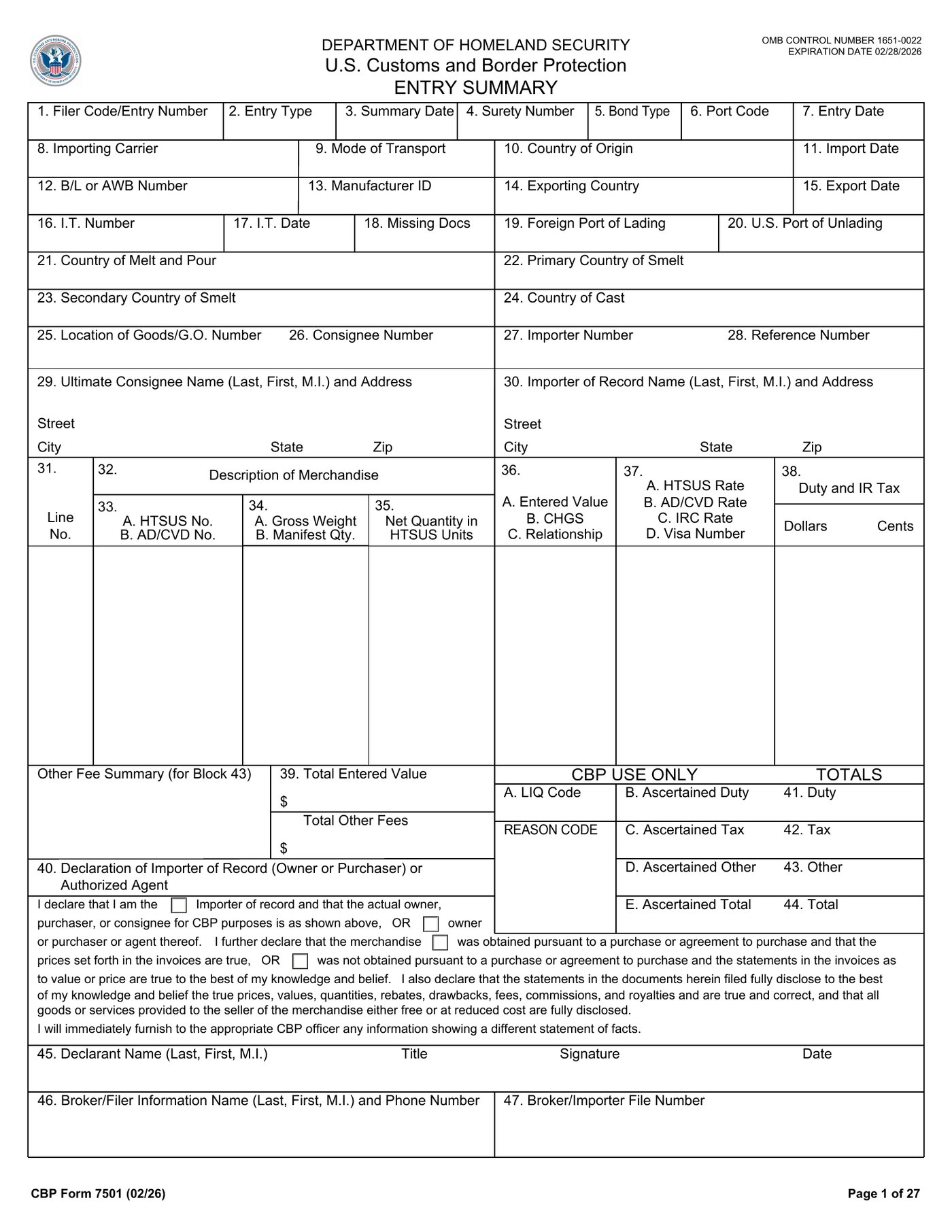
Pull every Form 7501 where IEEPA duties were paid. If you work with a customs broker, they can export this list for you in minutes, ask for “all entries with HTS Chapter 99 IEEPA provisions” between the dates of the IEEPA orders and the date the courts vacated them.
While your 7501s are out, two other fields will be useful for the ACE Portal application itself, separate from the CSV: Block 27 is the Importer Number, your IRS EIN, formatted as NN-NNNNNNN. Block 30 is the Importer of Record Name and Address. The portal application asks for both. Do not confuse them with Block 26 (Consignee Number, which is a different EIN) or Block 23 (Secondary Country of Smelt, which is aluminum-specific).
Build the CAPE Declaration CSV File
One column, one header, one entry per row. CBP is explicit: nothing else goes in the file.
The CAPE Declaration is a simple comma-separated values file. CBP provides the template through the “Upload” button in the CAPE tab of your Importer sub-account; the downloaded file is named ACEP_CapeEntryNumberUploadTemplate.csv. CBP’s documentation is explicit on this point: “CBP will not require any other information in the .CSV file.” Do not add columns. Do not change the header. Anything extra fails validation.
The format is a single column, with the header Entry Number on row 1 and one entry per row after that. Here is what an actual file looks like:
1Entry Number2K42 5917628-33K42 5917635-1
Each Declaration has a hard limit of 9,999 entries. If you have more than that, file multiple Declarations. There is no penalty for splitting; CBP processes them independently.
One detail brokers should know: a single CAPE Declaration is not limited to one IOR. A licensed customs broker can include up to 9,999 entries spanning various IORs in one file, as long as the broker was the original filer for each of those entries. If your broker has been filing for dozens of small importers across the same IEEPA window, this is the most efficient way to handle the bulk recovery.
Upload the CAPE Declaration in the ACE Portal
The portal validates each entry against CBP records. Valid entries flip the IEEPA Chapter 99 provision off. Invalid entries get flagged with a reason.
With your bank details saved and your CSV built, navigate to the CAPE tab inside your Importer sub-account view. Click Upload, select your ACEP_CapeEntryNumberUploadTemplate.csv file, and submit.
The portal validates each entry against CBP’s records. If an entry on your list isn’t actually an IEEPA-duty entry, wasn’t filed by you (or by you as the broker), or falls outside Phase 1 eligibility, already liquidated for more than 90 days, warehouse entry, suspended, or under extension , the system flags that line and rejects it. Valid entries move to acceptance.
Once your Declaration is accepted, ACE updates the affected entry summary lines automatically. The IEEPA Harmonized Tariff Schedule Chapter 99 provision is removed, the corresponding IEEPA duties are zeroed out, and an updated entry version is generated. CBP then either liquidates or reliquidates the entries depending on their current status, and your refund moves to issuance.
What Happens After You Submit
CBP states that valid IEEPA refunds will generally be issued within 60 to 90 daysfollowing acceptance of the CAPE Declaration, unless a compliance concern requires further review. Refunds are consolidated by Importer of Record and by liquidation date. If you have a CBP Form 4811 “notify party” on file directing refunds to a specific entity, common when a customs broker or financing partner is the receiving party, refunds for entries under that arrangement go to the notify party instead.
Two important caveats from CBP, both worth flagging to your accounting team in advance:
- Refunds are netted under 19 CFR § 159.1, meaning over- and under-payments across the full entry are reconciled at liquidation. If you owe CBP money on a different line of an entry that’s being reliquidated, that gets pulled from your refund first.
- Refunds can be diverted under 19 CFR § 24.72 to offset legally fixed and undisputed unpaid debts the importer owes the United States. Tax debts, prior duty bills, fees in collection, all can be deducted before your refund hits the bank.
The Mistakes That Will Slow Down Your Refund
Across our walkthrough, the failure modes we saw most often, either in CBP’s documentation or on screens that gave us trouble, cluster into a handful of categories. None are catastrophic, but each can add days or weeks:
- Using your broker’s email on Form 5106.The 5106 email is the authentication anchor for ACE Portal account creation. If it’s your broker’s address, account creation fails and you have to fix the 5106 record first.
- Skipping ACH bank setup before the refund triggers. The Declaration can be accepted while bank details are still missing; the refund then processes as rejected and lands on REV-613.
- Including ineligible entries.Phase 1 covers unliquidated entries or entries within the 90-day voluntary reliquidation period only. Anything older or anything that’s a warehouse, suspended, or extended entry will fail validation.
- Filing through ABI. The CAPE Declaration is web-Portal only. Brokers who default to ABI need to switch tracks for this filing.
- Wrong filer. Only the IOR, or the licensed customs broker who actually filed the original entries, can submit. A broker your company hired last month cannot file Declarations for entries the previous broker submitted.
Should You Sell Your Refund Claim to a Hedge Fund?
Several hedge funds and trade-finance firms have started offering importers immediate cash in exchange for assigning them the CAPE refund. The economics are simple: the fund pays you a percentage of the expected refund up front (offers we have seen range from 70% to 90% of face value), and they collect the full amount when CBP issues it 60 to 90 days later.
For most small importers the math doesn’t favor selling. CBP’s stated 60-to-90-day window is short relative to typical receivables financing, the underlying claim is against the U.S. government (so credit risk is essentially zero), and the discount the funds are charging effectively works out to triple-digit annualized rates. If you can wait three months, wait three months.
Where it does start to make sense is in two specific scenarios. First, importers with cash flow problems who would otherwise pay 12% to 20% on a working-capital line, handing 15% to a fund for 90 days of float can be the right trade. Second, importers with very large claims (six or seven figures) who want certainty over timing and are willing to accept a haircut to remove the risk that compliance review extends the timeline. Either way, before signing, treat it the way you would any assignment agreement, read who is taking on what, what happens if CBP delays, and what recourse you have if the fund refuses to release the assignment.
What's Coming in Later CAPE Phases
CBP has been explicit that Phase 1 is intentionally narrow and that “more functionality” for “more complicated scenarios” is coming in later phases. The categories explicitly excluded from Phase 1, entries liquidated more than 90 days ago, warehouse entries, entries under suspension or extension review, are the most likely candidates for Phase 2.
If your entries don’t qualify under Phase 1, the practical guidance is: keep your records clean, monitor the IEEPA Duty Refunds page for updates, and be ready to refile under a later phase. Don’t assume a Phase 1 ineligible entry is permanently ineligible. Phase 2 specifications haven’t been published yet.
Q.01Who can file a CAPE Declaration?
Who can file a CAPE Declaration?
Q.02How long does it take to get an IEEPA refund?
How long does it take to get an IEEPA refund?
Q.03Can a broker file for multiple importers on one Declaration?
Can a broker file for multiple importers on one Declaration?
Q.04Do I need a Court of International Trade case?
Do I need a Court of International Trade case?
Official CBP Resources
Bookmark these, CBP updates its CAPE guidance regularly and the IEEPA Duty Refunds landing page is the canonical version of record.
- [01]IEEPA Duty Refunds, main landing pageU.S. Customs and Border Protection
- [02]Electronic Refund Enrollment one-pager (PDF)U.S. Customs and Border Protection
- [03]Applying for an ACE Secure Data Portal AccountU.S. Customs and Border Protection
- [04]Automated ACE Portal Account Application for Importers (PDF)U.S. Customs and Border Protection
- [05]CBP Form 7501, Entry Summary (PDF)U.S. Customs and Border Protection
- [06]ACE Portal, loginU.S. Customs and Border Protection
- [07]ACE SupportU.S. Customs and Border Protection
If you run a small business that imports anything, the CAPE refund is one of the highest-leverage administrative tasks on your plate this quarter. The portal is clunky, the official one-pager glosses over the parts that matter, and most search results are news-site overviews that won’t help you actually file. But the process works. Get your Form 5106 email squared away, pull your Block 1 entry numbers, save your bank details to the ACH Refund Authorization tab, and upload the CSV. Sixty to ninety days later, the refund hits.